How to Prevent Task Starvation in AI Agent Worker Queues
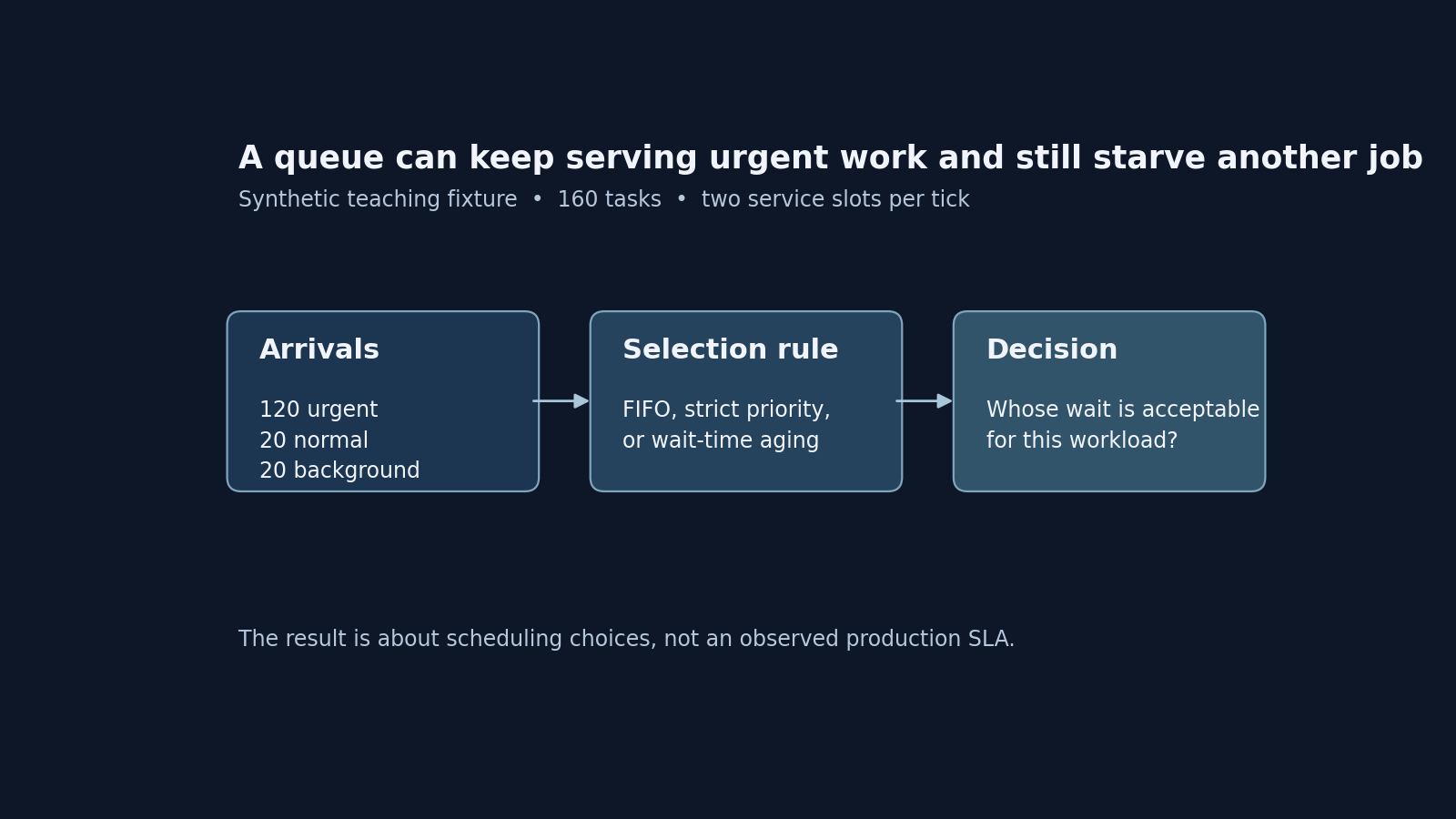
Strict priority keeps urgent agent tool calls fast, but background work can wait until the rush ends. A 160-task simulation compares FIFO, strict priority and wait-time aging.

Daniel MartinContributor
Disclosure. The simulation (run.mjs) and figure script (render_figures.py) were built with help from Codex and reviewed, run and checked by the author. All numbers come from a synthetic, deterministic fixture, not production telemetry.

When you first set up a worker pool for an AI agent, sending every tool call through one queue feels clean and easy to maintain. It doesn't stay that way for long. Two very different kinds of work end up competing for the same execution slots:
- Urgent calls. A user is waiting in a chat window or an IDE while the agent calls a live search or lookup tool.
- Normal and background tasks. A scheduled job refreshes cached metadata, checks for broken links or runs an audit that nobody is watching in real time.
If the shared queue is first-in, first-out (FIFO), a batch of 20 background jobs at the top of the minute makes interactive users wait behind bulk maintenance. The usual fix is a strict priority queue: urgent calls get priority 3, normal tasks 2 and background jobs 1.
Strict priority works well when the system is quiet. The trouble starts when urgent requests arrive in a steady stream that matches your worker capacity. Every slot goes to new urgent work, and the background jobs at the bottom of the queue don't move until urgent traffic dries up. That is task starvation.
In this tutorial you'll build and run a small, deterministic Node.js simulation, run.mjs, with no dependencies. It runs FIFO, strict priority and a wait-time aging rule against the same 160-task arrival stream. You'll trace individual task waits, compare the 95th-percentile (p95) wait for each class, and see how to pick an aging rate that matches your own service goals.
All inputs and outputs here come from a synthetic teaching fixture built to isolate the scheduling maths. Time is measured in abstract ticks. None of the numbers are production telemetry, live customer traffic or seconds-based SLA measurements.
Prerequisites
To run the simulation yourself, you need:
- Node.js 18 or later. The fixture was tested on Node 24.18.0 and uses only the built-in
node:fsmodule. - Basic familiarity with job queues and array sorting in JavaScript.
- Optionally, Python 3 and Matplotlib, if you want to regenerate the charts with
render_figures.py.
Build one fixed 160-task arrival trace
A fair comparison needs every policy to face the same arrivals and the same worker capacity. The fixture doesn't use a random number generator: a fixed arrival pattern makes the bottleneck easier to see and to debug.
Time advances in discrete ticks, from tick 0 to tick 79. The fixture models a 60-tick rush (ticks 0–59) against a worker that runs 2 tasks per tick:
- 20 background tasks (priority 1) all arrive together at tick 0, with ids 0–19.
- 120 urgent tasks (priority 3) arrive at exactly 2 per tick from tick 0 to tick 59 (60 × 2 = 120).
- 20 normal tasks (priority 2) arrive one every third tick, starting at tick 0 (ticks 0, 3, 6 … 57).
That's 160 tasks in total. With 2 slots per tick, serving all of them takes exactly 80 ticks. A task's delay is:
wait = served_tick − arrival_tickHere is a simplified version of the workload generator. The field names are shortened for reading; the runnable
run.mjsproduces the same arrivals:const BASE_PRIORITY = { urgent: 3, normal: 2, background: 1, }; function generateTasks() { const tasks = []; let nextId = 0; // 20 background tasks arrive together at tick 0 for (let i = 0; i < 20; i++) { tasks.push({ id: nextId++, klass: "background", arrivalTick: 0, basePriority: BASE_PRIORITY.background, }); } // Across ticks 0..59, 2 urgent tasks arrive per tick // and 1 normal task arrives every third tick for (let tick = 0; tick < 60; tick++) { for (let u = 0; u < 2; u++) { tasks.push({ id: nextId++, klass: "urgent", arrivalTick: tick, basePriority: BASE_PRIORITY.urgent, }); } if (tick % 3 === 0) { tasks.push({ id: nextId++, klass: "normal", arrivalTick: tick, basePriority: BASE_PRIORITY.normal, }); } } return tasks; }This pattern is a deliberately sharp stress test. For the first 60 ticks, urgent arrivals alone (2 per tick) use the worker's full capacity (2 slots per tick).
Score pending tasks under three policies
At each tick, the worker looks at every task that has arrived (
arrivalTick <= currentTick) and hasn't run yet. It has to pick two.Any priority queue needs two things: a priority score and a tie-breaking rule. The notes on priority queue implementation in Python's
heapqdocumentation cover why ties need explicit handling: two tasks with the same score should fall back to a predictable order, usually insertion order, rather than failing on comparison or shuffling unpredictably.In this simulation, when two tasks have the same score, the one with the earlier
arrivalTickwins, then the one with the lowerid.The three policies score a pending task like this:
- FIFO (
fifo) ignoresbasePriority. Every task scores 0, so the tie-breaker serves the oldest arrival first, then the lowest id. - Strict priority (
strict_priority) scores each task by its fixedbasePriority: urgent 3, normal 2, background 1. - Wait-time aging (
aging) starts frombasePriorityand adds a linear boost for time spent waiting:
effective_priority = basePriority + (currentTick − arrivalTick) / 20Here is the scoring and selection logic, adapted from
run.mjs:function scoreTask(policy, task, currentTick) { const waitingTicks = currentTick - task.arrivalTick; if (policy === "fifo") { return 0; } if (policy === "strict_priority") { return task.basePriority; } if (policy === "aging") { // +1.0 priority for every 20 ticks spent waiting return task.basePriority + waitingTicks / 20; } throw new Error(`Unknown policy: ${policy}`); } function comparePending(policy, currentTick, a, b) { const scoreA = scoreTask(policy, a, currentTick); const scoreB = scoreTask(policy, b, currentTick); if (scoreA !== scoreB) { return scoreB - scoreA; // Higher score wins } if (a.arrivalTick !== b.arrivalTick) { return a.arrivalTick - b.arrivalTick; // Older arrival wins a tie } return a.id - b.id; // Lower id wins the final tie }Why the aging rule matters by tick 40
Under the aging policy, a new urgent task has waited 0 ticks, so it scores 3 + 0/20 = 3.0.
The 20 background tasks that arrived at tick 0 start at 1.0. Under strict priority, 1.0 never beats 3.0. Under aging, each waiting background task gains 0.05 (1/20) per tick:
- At tick 20, a background task from tick 0 scores 1 + 20/20 = 2.0, the same as a new normal task.
- At tick 40, it scores 1 + 40/20 = 3.0. That ties with a new urgent task arriving at tick 40, and the background task wins the tie because it arrived earlier.
Dividing by 20 is one illustrative aging rate for this fixture, not a universal constant.
- FIFO (
Run the fixture and compare wait times by class
Run the simulation and print the summary table:
node run.mjsTo also write the aggregate summary (
summary.json) and all 480 per-task records (rows.json: 160 tasks × 3 policies), add--write:node run.mjs --writeThe table below shows the p95 wait within each class, in ticks, using the nearest-rank method:
Policy Urgent p95 wait Normal p95 wait Background p95 wait Background tasks served FIFO 20 20 9 ticks 0–9 Strict priority 0 57 79 ticks 70–79 Aging (+ wait/20) 16 36 52 ticks 43–53 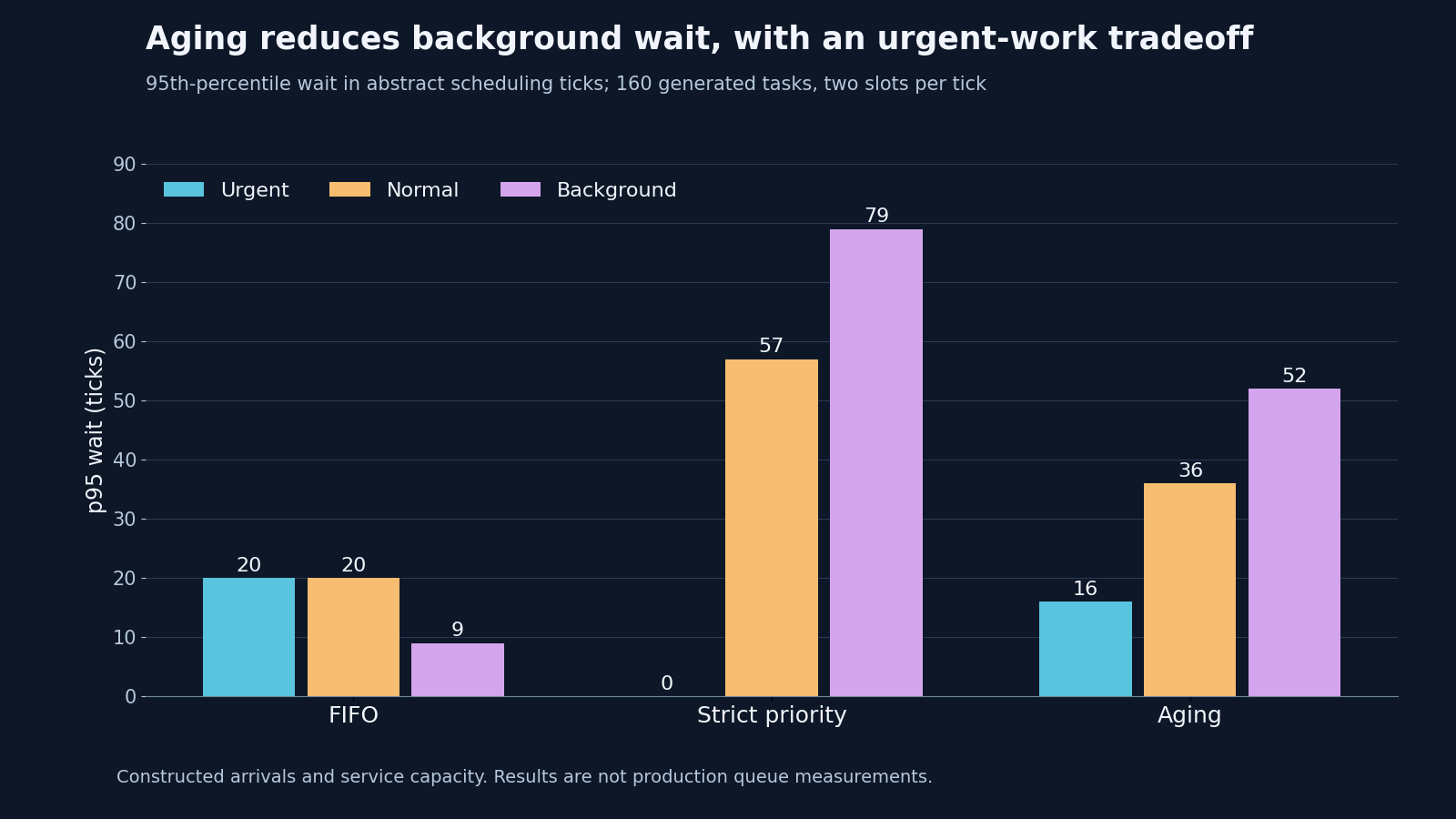
Deterministic 160-task fixture. All three policies used the same arrivals and the same two-slot capacity.
Trace one background task through all three runs
The summary numbers make more sense when you follow a single task. Take background task id=0, which arrives at tick 0, and look up in rows.json when it gets a slot under each policy.
FIFO: served at tick 0, wait 0. Tasks 0–19 were added to the array before the urgent and normal tasks that also arrive at tick 0, so FIFO gives the first 10 ticks (20 slots) to the background batch. Task 0 runs at tick 0 and the last background task at tick 9 (p95 = 9). The cost is that every urgent and normal task starts 10 ticks behind. The backlog never clears during the rush, so urgent and normal p95 waits both reach 20 ticks.
Strict priority: served at tick 70, wait 70. From tick 0 to tick 59, the two urgent arrivals take both slots every tick, so urgent tasks wait 0 ticks (p95 = 0). When urgent arrivals stop at tick 60, the worker spends ticks 60–69 clearing the 20 queued normal tasks (p95 = 57). Task 0 finally runs at tick 70, and the rest of the background batch finishes across ticks 70–79 (p95 = 79).
Aging: served at tick 43, wait 43. Urgent tasks dominate at first. From tick 20, the earliest normal tasks (arrived at ticks 0, 3, 6 … with base priority 2) have aged enough to tie or beat fresh urgent arrivals, so they start running between them. Task 0 reaches a score of 3.0 at tick 40 and, once the aged normal tasks ahead of it clear, runs at tick 43. All 20 background tasks finish between ticks 43 and 53 (p95 = 52). That's 27 ticks earlier than their first service under strict priority. In exchange, urgent p95 wait rises from 0 to 16 ticks, while normal p95 wait drops from 57 to 36.
A boundary in this experiment
Because urgent arrivals stop at tick 59, strict priority causes a long delay here (ticks 70–79), not permanent starvation. If urgent tasks kept arriving at 2 per tick forever, strict priority would never serve the background work. Aging would still give background tasks slots once their score caught up with fresh urgent work, after about 40 ticks of waiting. With arrivals permanently above capacity, though, the backlog and every class's wait would keep growing; aging shares the delay out, it doesn't remove it.
Step 4: Choose a scheduling rule for your own queue
Ticks in a 160-task array aren't milliseconds or production SLAs. To apply this to a real agent worker pool, start with two numbers from your own system:
- Your interactive latency budget (the urgent p95 ceiling). How long can a user-facing tool call wait in the queue before the agent feels slow or times out? For example, 500 ms or 2 seconds of queue wait.
- Your maximum acceptable background lag. How old can a background audit or index sync get before stale data starts to hurt users? For example, 5 or 15 minutes.
With those limits written down, choose a policy:
- Use strict priority only with guaranteed spare capacity, or separate worker pools. If urgent arrivals reliably leave gaps, strict priority keeps interactive waits low while background tasks fill the gaps. Check that against a real trace of arrival and service times before relying on it.
- Use wait-time aging when all classes share a constrained pool. Set the aging denominator (A in
waiting_time / A) so a background task reaches urgent priority just before it breaches your maximum lag. For example, with urgent at 3, background at 1 and a 120-second limit, A = 60 seconds gives a background job that has waited 120 seconds a score of 1 + 120/60 = 3.0, tying a new urgent task. Older or higher-scored work may still be ahead of it, so this doesn't guarantee a 120-second limit. If you need a hard deadline, test the real queue and reserve capacity for it. - Alert on promotion rate, not just queue depth. In production, track how often background tasks age past urgent priority. If it happens constantly, the worker pool is too small for your baseline urgent load.
Limitations: what this fixture leaves out
A deterministic script is the quickest way to check queue-scoring maths, but real schedulers deal with things this 160-task model deliberately leaves out:
- Variable service times and head-of-line blocking. Every task in the fixture finishes in one tick. In a real agent worker, a promoted background task might spend 30 seconds scraping a large document while an urgent lookup takes 100 ms. Letting that background task into a two-slot worker ties up one slot for 30 seconds.
- Preemption. Once a task takes a slot in
run.mjs, it finishes straight away. Cluster schedulers can do more: Kubernetes pod priority and preemption (opens in a new tab) can evict lower-priority pods when a higher-priority pod can't be placed on any node, with back-off and feasibility rules that a simple in-memory work queue doesn't model. - Retries, concurrency limits and per-tenant fairness. If one customer sends 500 "urgent" agent calls at once, neither strict priority nor simple aging protects other tenants. You still need per-tenant rate limiting or fair queuing alongside class priority.
Next step: test it with your own traffic
Before you change a production queue, take run.mjs and replace the arrival loop in generateTasks() with a 1,000-row timestamp trace exported from your own job logs. Run fifo, strict_priority and two or three aging denominators against your real arrival pattern. You'll see the urgent-versus-background wait trade-off before any user feels the delay.
Daniel Martin
Cofounder of AgentSEO
Daniel Martin is a software engineer and cofounder of AgentSEO, where he works on Model Context Protocol (MCP) servers and search-data automation workflows.
Keep learning
Plain-language explanations, technical guides and practical comparisons.

